Four words for “Artificial Intelligence”
- Prediction — a system guessing the next thing before I ask.
- Data — the piles of it that have to exist first.
- Recommendation feeds — the invisible ranking deciding what I see next.
- Wearables — recovery scores, sleep staging, training load; the AI I actually work on day to day.
Everyday AI Activity
Top three devices / digital services with AI in my life:
- My sports watch (COROS) — recovery, training load, sleep, HR-based estimates.
- My phone keyboard — autocomplete and next-word prediction, in English and Chinese.
- A streaming/recommendation feed — Spotify daily mixes / Netflix rows / short-video feed (pick the real one).
A moment AI “guessed” something about me. Draft: My watch flagged that my recovery was poor and quietly suggested an easy day — before I’d consciously admitted to myself that I was run down. It felt useful and slightly uncanny at the same time: a model reading my body’s signals and narrating a state back to me that I hadn’t put into words yet. That’s the exact double feeling the guide describes — helpful, but also “someone is keeping track of my patterns.”
AI function table.
| Device or service | What the AI is doing |
|---|---|
| Email inbox | Spam filtering, priority sorting, and smart-reply suggestions. |
| Check depositing | Image recognition / OCR reading the numbers and amount off the photo. |
| Texting & mobile keyboards | Autocomplete, next-word prediction, autocorrect. |
| Google (search) | Ranking results, interpreting the query, autocompleting it. |
| Netflix | Recommending and ordering titles based on watch history. |
| Social media (IG / FB / X) | Ranking the feed, targeting ads, moderating content. |
| Automated message systems | Chatbots classifying intent and routing or answering. |
What do we gain by having AI in everyday life? Convenience and speed; personalization that genuinely fits (the right playlist, a training plan that adapts to me); accessibility features that lower barriers; small cognitive loads offloaded so I can spend attention elsewhere.
What do we lose? Privacy and a clear sense of what’s being collected; transparency about why a decision was made; some autonomy, because a ranked feed quietly narrows what I even consider. The guide’s framing sticks with me here: AI right now is “more like a bulldozer than a hammer” — a powerful tool, but one that takes money, data, and training to wield, so it stays concentrated in big companies and governments rather than in ordinary hands.
Design an AI system for a problem I actually see.
- What problem am I addressing? Draft: Recreational runners over-train because they can’t tell the difference between “healthy tired” and “about to get injured,” and generic plans ignore how their body is actually recovering.
- How can AI help? Learn each person’s baseline and flag when their load, sleep, and HR variability drift toward injury risk — a personalized early warning, not a one-size plan.
- What role do humans have? The runner decides; the system advises. A coach (or the runner) stays in the loop to override, because the model can be wrong and the cost of being wrong lands on someone’s body.
- What data do I need? Heart rate, HRV, sleep, workout history, subjective effort/soreness logs, and injury outcomes to learn from.
- How do I gather it responsibly? Opt-in and clearly explained; data stays on-device or encrypted where possible; the person can see, export, and delete it; no quiet resale to third parties. Consent is ongoing, not a one-time checkbox.
(Optional per p.28: I sketched the system as a simple flow — inputs → personal baseline model → risk flag → human decision. I’ll add the drawing here.)
Closing thought. Every service in that table runs on data that I generate but don’t control. The bulldozer/hammer line is really a question about power: the AI in my watch is genuinely useful, and it’s also owned by a company whose training data and objectives I can’t see. Holding both of those truths at once is, I think, the point of the exercise.
Video Image Classification: 1/2
What the model recognizes correctly
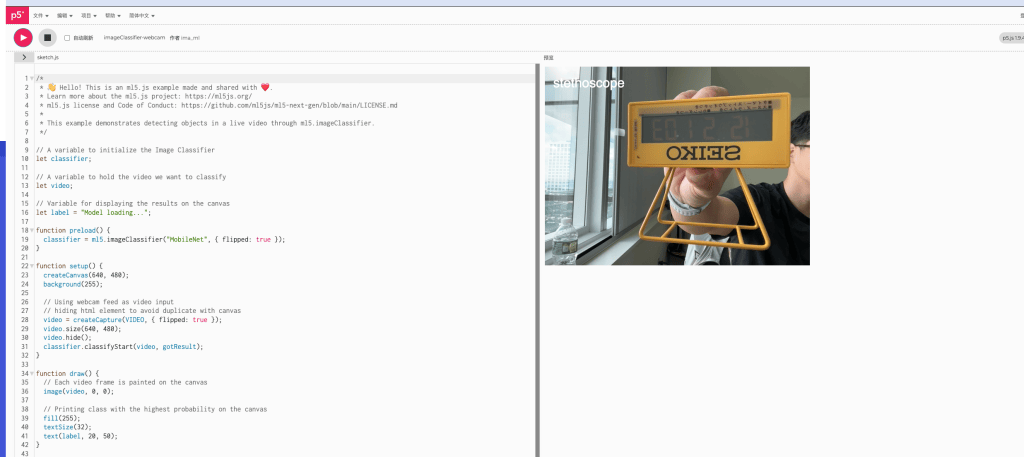
MobileNet is trained on ImageNet’s 1,000 classes, so it does best with common, centered, well-lit objects that resemble its training categories. The SEIKO digital clock is a good example — “digital clock” is an actual ImageNet class, so the model has a real chance of getting it right.
What the model doesn’t recognize correctly
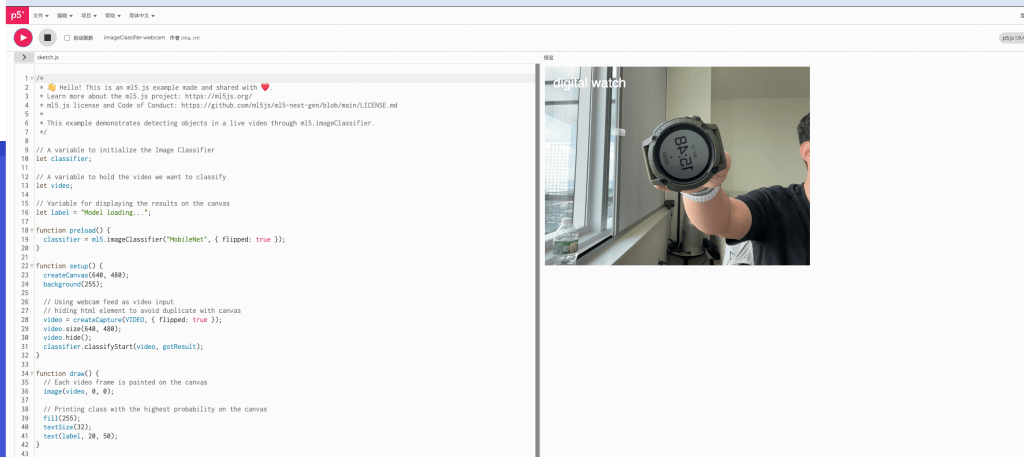
- The COROS watch has no matching ImageNet category, so it can only be mapped to the nearest lookalike — “digital watch,” “stopwatch,” or “magnetic compass.” The shapes are close, but this shows the model judges by visual form, not by what the object actually does.
- Even though SEIKO has a valid category, the model may still land on neighboring classes (“digital watch,” “stopwatch,” “scoreboard,” even “iPod”), because it’s matching features like “rectangular glowing display with characters” rather than the device’s function. The bold SEIKO text and black rectangular face are exactly what push it toward these screen/display categories.


Leave a comment